Help
Duplicate Detection
How claims modules flag possible duplicate claims, per program type. Button names match the English UI.
This is for Allura staff who can see Duplicate Detection. These rules apply when redemption/claims run; they do not scan history by themselves when you save.
Related: Administration panel.
Before you start
- You are signed in to VIPA.
- Settings, then Duplicate Detection.
The screen
Title Duplicate Detection. Text: How the claims modules flag potential duplicate claims, set per program type. The natural duplicate key differs by how each type is claimed — any basis can be assigned to any type.
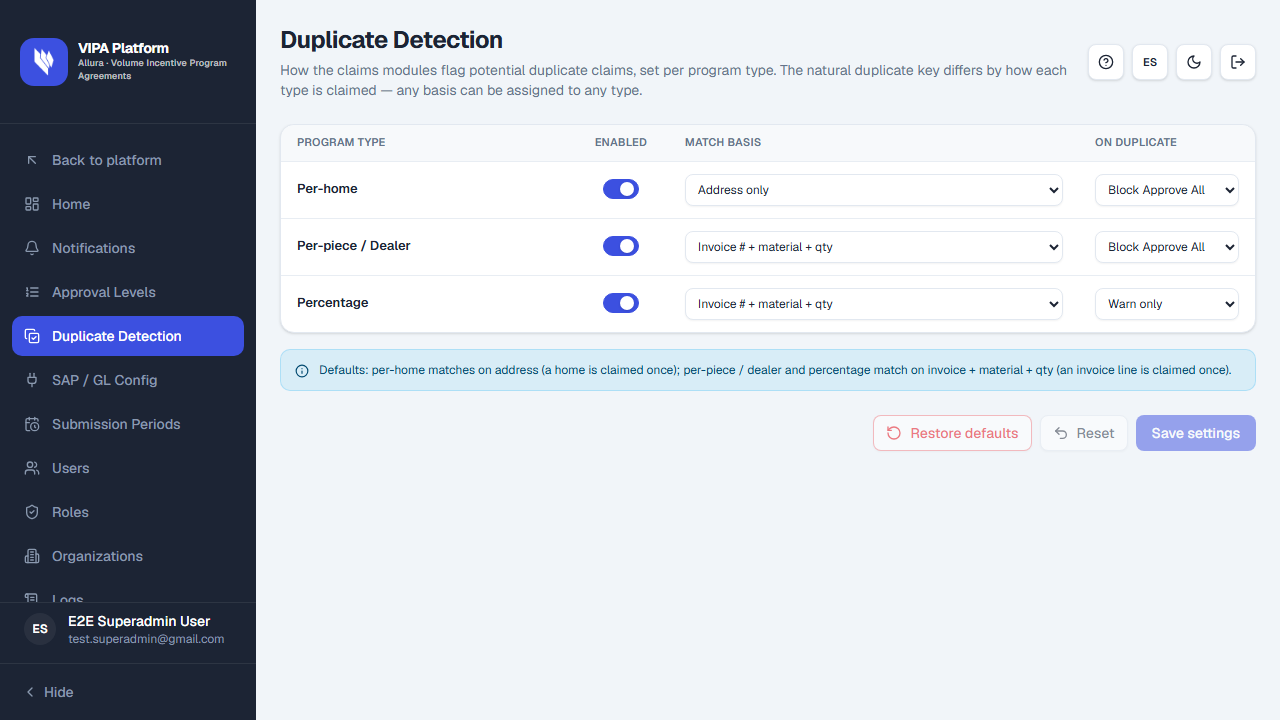
Info on the page: Defaults: per-home matches on address (a home is claimed once); per-piece / dealer and percentage match on invoice + material + qty (an invoice line is claimed once).
The table
| Column | Meaning |
|---|---|
| Program type | Per-home, Per-piece / Dealer, Percentage. |
| Enabled | Whether that rule is on. |
| Match basis | Address only, Address + invoice date, Invoice # + material + qty, Invoice # + amount, Invoice # only. |
| On duplicate | Block Approve All or Warn only. |
Save, reset, restore
Use Save settings, Reset, and Restore defaults as on the other settings screens.
If something goes wrong
| What you see | What to do |
|---|---|
| Saving does not block a claim today | Expected until claims redemption uses these rules in daily work. |
| You do not see the menu item | You lack settings permission. |