Help
Approval Levels
How to edit the margin-analysis approval chain. Button names match the English UI.
This is for Allura staff who can see Approval Levels in administration. The banner Not wired to live chain yet means saving the table does not yet drive live margin approvals.
Related: Administration panel.
Before you start
- You are signed in to VIPA.
- Settings in the platform menu, then Approval Levels in the administration sidebar.
The screen
Title Approval Levels. Text: Configurable approval tiers for the margin-analysis chain. Order is the sequence approvals are requested in. Defined here for future routing — not yet wired to the live chain.
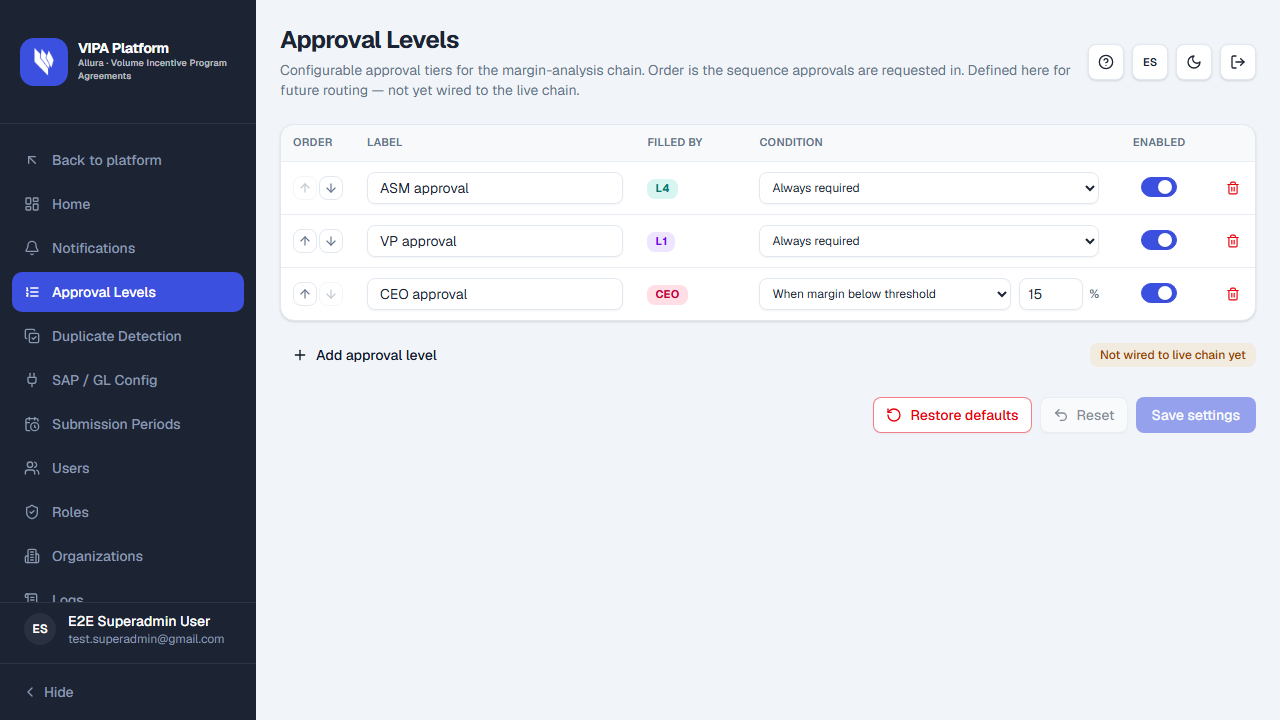
The table
| Column | Meaning |
|---|---|
| Order | Sequence of requests. Use Move up / Move down. |
| Label | Name of the level. |
| Filled by | Who completes that step. |
| Condition | Always required or When margin below threshold (then Threshold appears). |
| Enabled | Whether the level is active. |
Add approval level adds a row (New approval level). Remove level deletes a row.
Save, reset, restore
Save settings, Reset, and Restore defaults work like the other settings screens. Confirm restore, then save if you want factory values stored.
If something goes wrong
| What you see | What to do |
|---|---|
| Not wired to live chain yet | Expected. You can still save the configuration for later. |
| You do not see the menu item | You lack settings permission. |